Everything Inglen does
The free app, the Plus phone app, and what each part of it can do. Every line here is in v0.7.6.
Local AI
A model on your own card, set up for you
The full download brings the official llama.cpp engine and fetches the build made for your graphics card, CUDA for NVIDIA, Vulkan for AMD and Intel, or one for the processor alone. No LM Studio or Ollama needed.
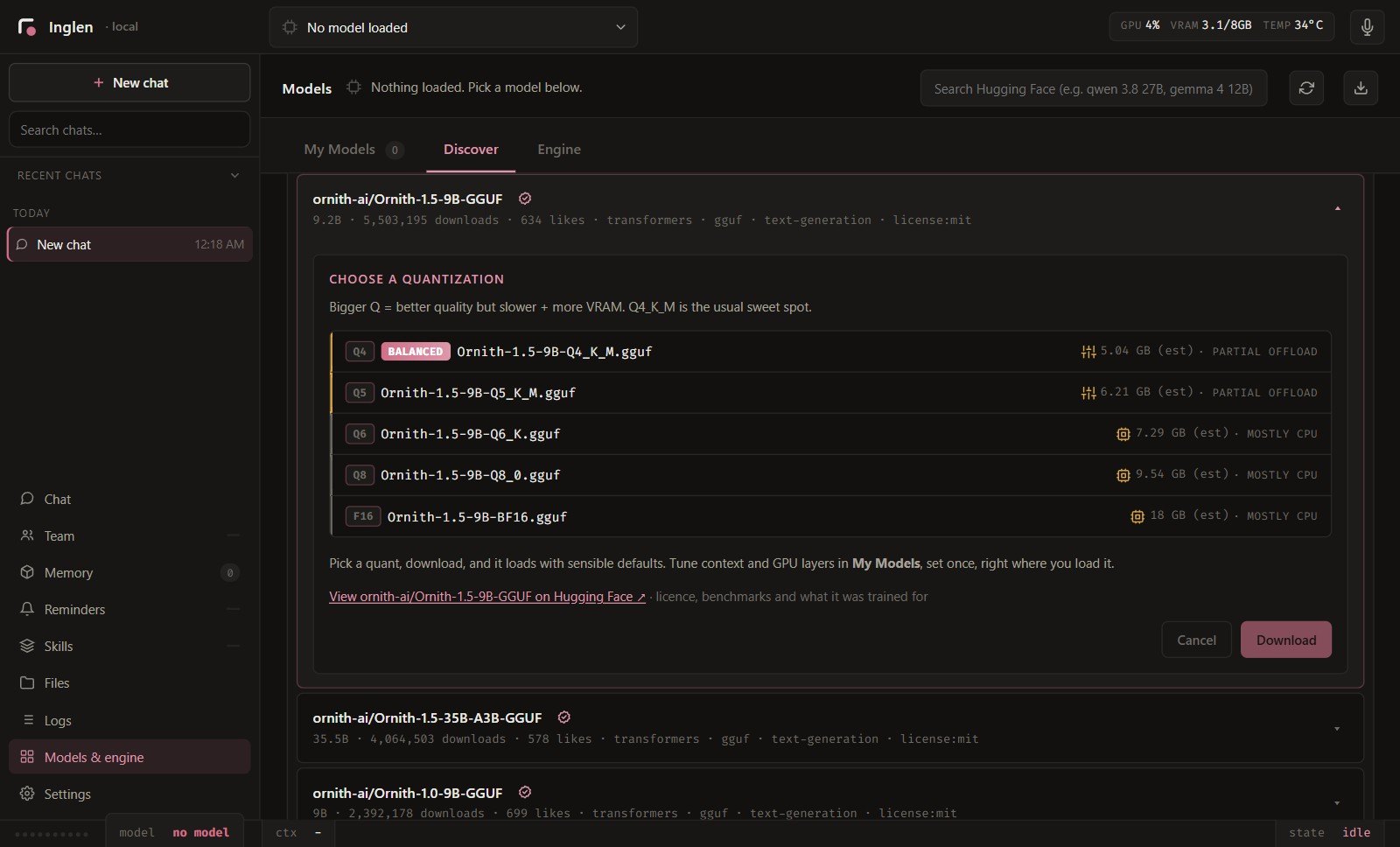
Search Hugging Face from inside the app. Every file is marked by whether it fits your card before you download it, and a download can pause and pick up where it stopped.
Add your own engine
A model made for a fork of llama.cpp still loads. Paste the fork's GitHub page and Inglen downloads the build for this PC, then uses it only for the models that need it.
Finds what you already run
LM Studio, Ollama or a llama.cpp server already running is picked up on its own. A model server on another computer in the house works too.
A second model for helpers
A smaller model can run beside the main one just for helpers, and the built-in server takes up to four requests at once when the card has room, so a team doesn't push your chat out of memory.
Settings read from the model
Context, GPU layers, cache type and sampling come filled in from the model itself, with an estimate of the graphics memory it will take.
Works offline
With a model on your PC, chats, files, memory and voice work with the internet off.
It sets itself up
Inglen knows what is installed on this PC. Ask for something it can't do yet, like seeing a picture, and it fetches the missing piece itself.
Agent brains
Think with the agent you already pay for
Claude Code, Codex and Cursor can think for Inglen on the plan you already pay for, with no API key, and keep Inglen's tools, memory and voice. Pick from one menu at the top, even mid-chat.
Eleven agent brains
Claude Code, Codex, Cursor and OpenCode have run as Inglen's brain. Copilot CLI, Goose, Grok Build, Gemini CLI, Pi, Amp and Antigravity are listed too, through the Agent Client Protocol.
Or your own key
Anthropic, OpenAI, Google Gemini, xAI, OpenRouter and Groq, or any OpenAI-compatible address.
Cost on every turn
Each reply shows what it cost on a key, or how much of your plan it used. When a provider's limit runs out, Inglen remembers when it resets.
Computer use
It works your PC the way you do
Inglen clicks, types and scrolls in your apps and in a browser you can watch. It reads each window through the accessibility tree, the same map a screen reader uses, so it finds the button by its name instead of guessing from pixels. That works inside Chrome and Electron apps too.
When an app gives no names to read, it draws numbers on a screenshot and picks the one it needs. Desktop control has been in every release since July 2026.
Your bills
delete_pathDocuments\Bills\september-2026 (1).pdf, september-2026 (2).pdfReads the screen, not the pixels
You always see what it's doing
While it drives the desktop, a panel at the right edge shows what you asked, each step as it happens and a question when it needs one, with Stop always there. Fold it and it shrinks into the Inglen mark.
A thin line in your accent runs round the screen, its own pointer moves to where it acts, a chime sounds at the end and your window comes back to the front. None of these are seen by the model when it looks at the screen.
Browser left, editor right, minimise, maximise or focus a window by its title, in one step.
Files and the web
Your files, your shell and a browser you can watch
Inglen reads text, PDF, Word, Excel, PowerPoint and EPUB files, and pulls one file out of an archive without unpacking it. It finds things by name across your usual folders, so you never have to give it a path.
The Files tab opens on Recent, the files Inglen wrote or changed, with Desktop, Documents and Downloads beside it, and each file opens in the apps Windows lists for it.
A browser you watch
Real Chrome or Edge with a kept profile. It reads, clicks and types by the text it sees, and can open a link in your own browser with your logins.
A shell that tells the truth
PowerShell with UTF-8 in and out and a real exit code, or cmd and bash. A slow job runs in the background while you keep talking.
Long PDFs
A 500-page PDF is read in parts, each one summed up, then put together into one answer.
Web search with no key
Several search services are asked at once and the answers merged. Pages come back as the article, without the menus.
@ to attach
Type @ to bring in a file, a folder or an earlier chat, or drop a file into the chat.
Documents it makes
PDFs, slide decks, spreadsheets and diagrams, from skills that come with it.
Memory
Memory that stays when the brain changes
What Inglen learns about you is kept on your disk as small notes you can read, change or delete. Move from a local model to Claude Code to a cloud key and it still knows you, because the memory belongs to Inglen, not to the model.
When something changes, the old fact moves to an archive instead of being lost.
Picks up where you left off
Each chat keeps a short card of its goal, what's done and what's open, so a new chat knows where things stand.
Search by time
Ask what you did last Tuesday and it searches those days, across every chat in the window and the terminal.
Shared with your coding agents
One switch hands Inglen's memory to Claude Code, Codex, Cursor and OpenCode as an MCP server.
Bring it with you
Setup imports what ChatGPT or Claude know about you from a prompt you paste, and finds Hermes' and OpenClaw's memory files on the PC.
Ideas on an empty chat
A new chat offers up to three things to ask or be reminded of, built from your notes.
House rules
Things it should always or never do live in one file it reads every turn, on every brain.
Voice
It answers out loud
Press the mic and talk. Listening and speaking both run on your PC. Talk over a reply and it stops on your first word, with echo cancelled so speakers work as well as a headset.
54 voices, eight languages
English, Spanish, French, Hindi, Italian, Japanese, Portuguese and Mandarin, with a Hindi voice for Hindi text.
Wake word
Say its name to wake it while another app has focus, and a small grid on the desktop shows it is listening.
Say stop
“Stop”, “cancel that” or “never mind” ends the turn on any brain. “Stop by the shop” doesn't.
Images and video
Pictures and video clips made on your PC
Inglen installs stable-diffusion.cpp built for your graphics card and runs image and video models with it. It reads the model folders of ComfyUI, WebUI or Forge where they are, without copying, and picks quantized files by the size your card can hold.
With a key, Grok Imagine, OpenAI Images and Gemini work too, whatever brain you chat with.
Flux, Flux 2 and Kontext, SDXL, Qwen Image and Z-Image for pictures. Wan, LTX and Hunyuan for video.
Team
Give it a team
Ask for “three on Codex, two on Haiku, one on this PC” and Inglen starts a mixed team. You watch them work in the Team room, click anyone to see the task and every step, and tell one something halfway through.
23 agent programs
Claude Code, Codex, Cursor and OpenCode have run as helpers, and Inglen has adapters for nineteen more, from Gemini CLI and Copilot to Aider and Goose. Inglen installs some of them for you, sets up others, and links to the maker's page for the rest.
Changes on their own copy
A coding helper in a git project works on its own copy. Bring its changes in, throw them away, or undo them later.
Race them
Give one task to two agents, run your tests on both and keep the one you like.
Side by side
Each helper can run in its own Windows Terminal pane, so you can watch them all at once.
Roles
Researcher, coder, librarian, summarizer and more, each with its own tools and its own cost.
Your agents' own sessions
The Claude Code, Codex, OpenCode, Gemini CLI and Pi sessions already on your PC can be read and carried on from Inglen.
Connectors and MCP
Reach it from your chat apps, give it any tool
Your own Telegram or Discord bot talks to Inglen, with a pairing code for anyone new and risky steps asked in the chat. Voice notes, photos and files go both ways.
Any MCP server's tools join Inglen's own, and Inglen can be an MCP server for LM Studio, Claude Desktop, Cursor or Cline.
Reach Inglen from
Tools in and out
Live steps in the chat
One status message is edited in place as it works, then the answer arrives under it.
Commands that answer at once
/status, /brain, /think and /new work from Telegram, Discord and the phone before the model is asked.
Reminders that run a tool
A reminder can run any tool when it fires, and reach your phone or the chat app you use.
Safety
One set of rules for every brain
One switch by the send box decides what asks first, Ask, Auto-edit or Auto, and Shift+Tab cycles it. The same switch answers Claude Code's, Codex's and Cursor's own permission asks, so every brain follows one set of rules.
Nothing risky runs without your yes
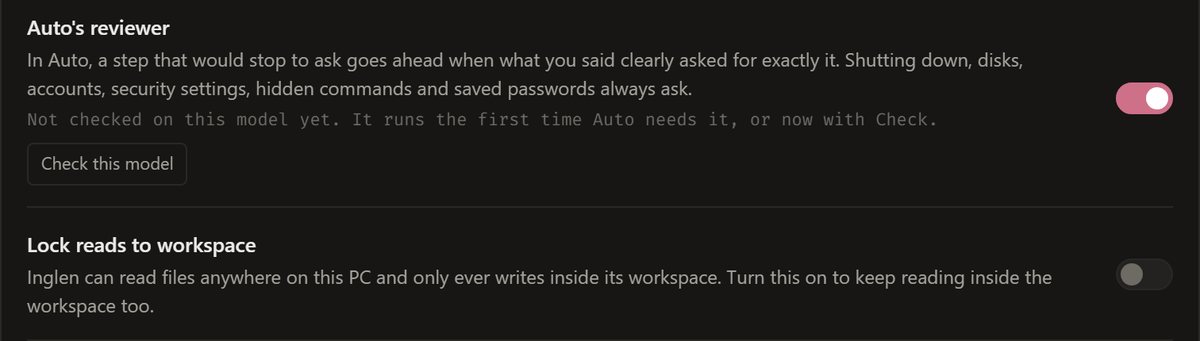
Auto has a reviewer
In Auto, a risky step goes ahead only when your own words asked for exactly it, and it says why when it holds one back.
Some things always ask
Shutting down, disks, accounts, the registry, security settings, start-up items and hidden commands ask in every mode.
Key files always ask
Reading .env files, SSH and AWS keys, browser logins and cookies or Windows' saved credentials asks first, in every mode.
Keys sealed on disk
Provider keys, bot tokens, your licence and your mail password are sealed with Windows' own encryption.
Undo
Its file tools copy a file before changing it, and /undo puts it back for up to a week.
Writes stay in its folder
Writes stay inside Inglen's own folder unless you allow another one, and it never runs as administrator.
Outside content can't send your data
After a chat reads a web page or a file, a request to an address nobody gave asks first.
Signed updates
Updates apply only with a valid signature from the release key.
Repair
Repair puts back missing or broken parts of the install and leaves chats and memory alone.
Appearance
Four looks, six accents
This is the chooser Inglen opens with at setup. Pick a look here and this page repaints, the way the app does. In the app, the tray and the terminal follow it.
Every feature, in a list
Brains
- A model on your PC, run by Inglen's own engine: the CUDA build on NVIDIA cards, Vulkan on AMD and Intel.
- It finds and downloads a model that fits your graphics card, with Pause, Resume and Cancel.
- Hugging Face search in the Models tab, each file marked by whether it fits your graphics card.
- A model made for a fork of llama.cpp loads too. Paste the fork's GitHub page and Inglen downloads its build for your card, used only for the models that need it.
- A second, smaller model can run just for helpers, so a team doesn't push your chat out of memory.
- Claude Code, Codex or Cursor as the brain, on the plan you already pay for, with no API key.
- Agents that speak the Agent Client Protocol, such as OpenCode, can be the brain too.
- Your own key for Anthropic, OpenAI, Google, OpenRouter, xAI or Groq.
- One menu to switch mid-chat, each agent opening into its own models. Think sets how hard it reasons.
- A model on this PC can stay loaded under a cloud brain, so helpers think with it for free.
- Each turn on a provider or an agent shows what it cost, or how much of your plan it used.
On your PC
- Reads and writes files, PDFs, Word, Excel and slides. Type @ to hand it a file, a folder or an earlier chat.
- Runs commands in PowerShell, cmd or bash, and a slow one can carry on in the background.
- Desktop control you can watch: an edge in your accent round the screen, a pill saying what it does, a chime when it ends.
- Clicks through other apps by the names of their buttons, or by numbers it draws on what it sees.
- Lays your windows out in one go: the browser on the left, the editor on the right.
- While it drives the desktop, a side panel shows what you asked, each step and Stop, and folds into the Inglen mark.
- The Files tab opens on Recent, the files Inglen wrote or changed, with Desktop, Documents and Downloads beside it.
- It knows what is set up on this PC and fetches a missing piece itself, such as the file that lets a model see pictures.
- Drives a browser window you can watch, or the Chrome you already use, with your logins.
- Reminders in plain words, said in a chat of their own. They can be changed, paused and resumed.
- Skills in the Agent Skills format, each with its own switch.
Voice
- Voice mode works like a call: you can talk over a reply, on speakers as well as a headset.
- Listening and speaking both run on your PC.
- Eight languages and 54 voices.
- It wakes on its name, and “Inglen, stop” cuts it off.
- A step that needs your OK is asked out loud, with Allow and Deny on the voice screen.
- The terminal listens too, with /listen.
Helpers and the Team room
- Big jobs split across helpers, each with a first name and a full log of its steps.
- A pixel room by the fire where you watch them work, and four rooms when the team grows.
- Helpers on this PC's model, on a provider's model, or on a coding agent you have installed. Inglen has adapters for twenty-three.
- Tell a working helper something part-way. Helpers ask each other questions and report in.
- A coding agent works on its own copy of your git repository; you bring its changes in, discard them, or undo them.
- Give one task to two agents, run your tests on both, and keep the one you like.
- Inglen installs some agent programs for you, sets up others, and links to the maker's page for the rest.
- Each helper can run in its own Windows Terminal pane, to watch them side by side.
- Reads and carries on the Claude Code, Codex and other coding agents' sessions on your PC.
Memory
- What it learns about you is kept as small notes on your disk that you can read, change or delete.
- When something changes, it replaces the old fact and keeps the previous one in the archive.
- It notes where each chat stood, so a new chat picks up the thing you meant.
- Ask about “last week” and it searches those days.
- Share with agents puts your memory in Claude Code, Codex, Cursor and OpenCode as a tool server.
- Setup can bring over what ChatGPT or Claude knows about you, and finds Hermes' and OpenClaw's memory files on the PC.
Phone and Plus
- Telegram, Discord and WhatsApp, free: new people get a pairing code and nothing runs until you approve them.
- Voice notes, photos and files go both ways, and a risky step asks in the chat.
- Plus: the Android app reaches your PC over the internet, end-to-end encrypted.
- Allow or deny a step from the lock screen, call your PC, and keep going with the screen off.
- Inglen can call you about a reminder or finished work, if you allow it, never in your quiet hours.
- Your local coding-agent sessions on your phone, no cloud session needed.
- Start a new coding-agent session on the PC from your phone, in any folder.
Connectors and MCP
- Email: read your inbox and send from your own address.
- Write your own connector as one Python file.
- Uses the tools of any MCP server you add, each asking before it runs.
- Its own tools work from other apps through its MCP server.
Images and video
- Pictures and video clips on your own graphics card, with stable-diffusion.cpp built for your card.
- Reads the models already in a ComfyUI or WebUI folder.
- Or from Grok, OpenAI or Gemini with your key, whatever brain you use.
Safety and approvals
- One switch for how much it does on its own: Ask, Auto-edit or Auto. Shift+Tab cycles it.
- In Auto, deleting, sending, installing and changing security settings still ask.
- Auto's reviewer lets a step through when your own words asked for exactly that.
- What its own file tools change keeps a copy for a week, and /undo puts it back.
- Writes stay in its own folder unless you allow another, and reads can be confined too.
- Reading .env files, SSH and AWS keys, browser logins and cookies or Windows' saved credentials asks first, in every mode.
- Keys, bot tokens and your licence are sealed on disk with Windows' own encryption.
- Updates are applied only when signed by the release key.
- Repair puts back missing or broken parts of the install and leaves chats and memory alone.
Window and terminal
- The window and the terminal share one set of chats.
- A first run that sets it up, then a short tour.
- A Logs page that reads in words, and /status for what is thinking and how much of your plan is left.